![Trellis-MainLogo-AllWhite-01.png]](https://help.trellis.org/hs-fs/hubfs/Trellis-MainLogo-AllWhite-01.png?height=40&name=Trellis-MainLogo-AllWhite-01.png)
Pickup Instructions are item-specific details that go out to donors once they win an auction item. Use this field to share things like pickup location, hours, or contact info so winners know what to do next, without you having to follow up manually.
How to Add Pickup Instructions
- From the Builder, click Silent & Live Auctions then Auction Items.
- Select the auction item you want to edit, or click Add Item to create a new one.
- Scroll to the Pickup Instructions field and enter the details for that item.
- Click Save, then Publish Changes.

Where Pickup Instructions Appear
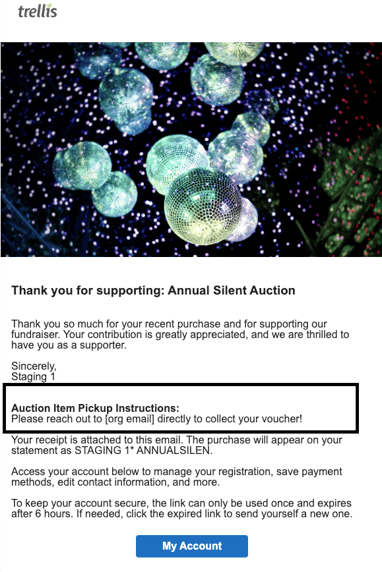
Pickup Instructions are included in the confirmation email sent automatically when a winning bidder's charge is successful. This is the same email that contains the winner's itemized receipt. The subject line of the email is Thank you for supporting: [Fundraiser Name].
What Donors See
Frequently Asked Questions
Do I need to add Pickup Instructions to every item?
No. Leave the field blank for items that don't require pickup.
Will donors see Pickup Instructions before they bid?
No. Pickup Instructions only appear in the confirmation email sent after a winning bid is charged successfully.