![Trellis-MainLogo-AllWhite-01.png]](https://help.trellis.org/hs-fs/hubfs/Trellis-MainLogo-AllWhite-01.png?height=40&name=Trellis-MainLogo-AllWhite-01.png)
If your organization already has a gift in Raiser's Edge NXT that you need to enter into Trellis, you won't want that same gift to auto-sync from Trellis and create a duplicate.
This setting gives you per-transaction control over gift syncing for offline transactions, without having to turn off your integration entirely.
Pro Tip: Offline transactions are any transactions completed using a payment method other than Stripe, such as cash, cheque, or other.
How to Prevent a Gift from Syncing to RE NXT
This option appears any time you process an offline transaction on Trellis, including:
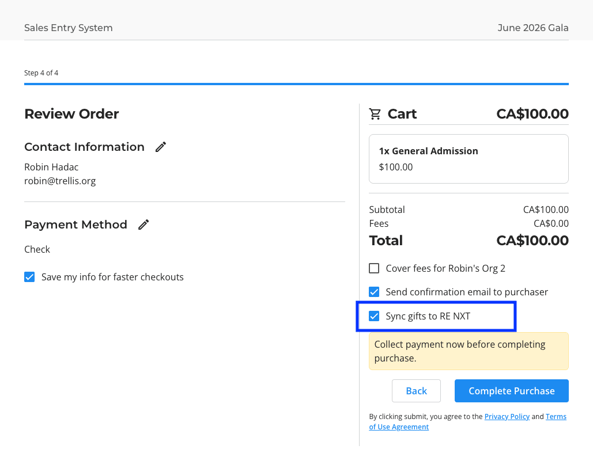
- Processing an offline transaction through the Sales Entry System (SES)
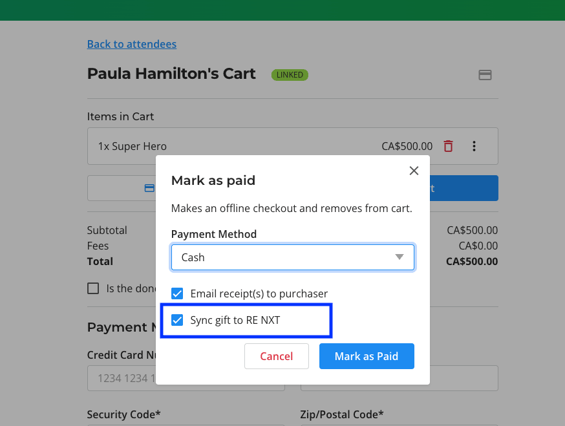
- Marking something as paid from the Attendee Cart
- Marking a pledge as paid
When processing one of these transactions:
- Complete the transaction details as usual if using the SES, or check Mark as Paid on a line item in an attendee's cart.
- Locate the Sync gift to Raiser's Edge NXT checkbox before confirming.
- Uncheck the box if the gift already exists in RE NXT and you don't want it duplicated.
- Proceed to confirm the transaction.
The gift(s) will not sync to RE NXT. This applies to all line items in the cart.
The constituent and event participant records will still sync automatically.
Please Note:
The Sync gift to Raiser's Edge NXT checkbox is checked by default. You only need to uncheck it when entering a gift that already exists in RE NXT.
Frequently Asked Questions
Does this setting apply to online transactions?
No - this option only appears when processing offline transactions (cash, cheque, etc.) on Trellis.
Can I change this after the transaction is processed?
No - The sync setting is applied at the time of processing and cannot be changed retroactively.
If a duplicate gift was synced in error, you can adjust the duplicate gift to $0.
If a gift did not sync and you now want the gift to appear, you will need to add the gift manually.
In the SES, can I select so that some line items sync while others don't?
The checkbox in the SES applies to everything that is in the purchase. If you want a part of that transaction to still sync as a gift, you will need to process that as a separate transaction.