![Trellis-MainLogo-AllWhite-01.png]](https://help.trellis.org/hs-fs/hubfs/Trellis-MainLogo-AllWhite-01.png?height=40&name=Trellis-MainLogo-AllWhite-01.png)
The Exports section in Trellis lets you pull a complete record of your auction items and associated details. This is useful for reconciling bids, sharing item lists with your team, or keeping records after your event wraps up.
How to Export Auction Items & Sponsors
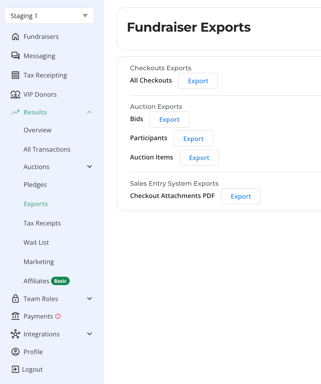
- In the left-hand navigation menu, click Results to expand the submenu.
- Select Exports from the dropdown.
- On the Exports page, locate the Auction Exports section and find Auction Items.
- Click the Export button.
- Choose to download the file to your computer or send it to an email address.
Need Help?
Did this answer your question? If not, please reach out to our Product Engagement Team via the blue chat icon or email support@trellis.org.