![Trellis-MainLogo-AllWhite-01.png]](https://help.trellis.org/hs-fs/hubfs/Trellis-MainLogo-AllWhite-01.png?height=40&name=Trellis-MainLogo-AllWhite-01.png)
How to Remove a Live Auction Item from an Attendee's Cart
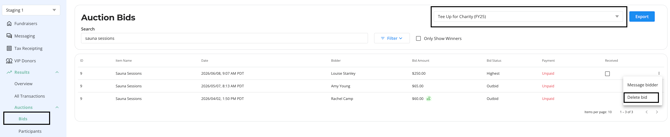
- Navigate to Dashboard > Results > Auctions > Bids.
- In the top-right corner, select the relevant fundraiser from the dropdown.
- Search for the attendee using their name, email address, listing ID, or item name.
- Once you've located the bid, click the three-dot menu.
- Select Delete Bid.
Please Note: Live auction items cannot be removed from the Check-In Tool. If you need to remove a live auction bid, it must be done through the Dashboard using the steps above.
Please Note: If you need to refund a live auction item and remove the item from the winner's cart, please refer to this article.