![Trellis-MainLogo-AllWhite-01.png]](https://help.trellis.org/hs-fs/hubfs/Trellis-MainLogo-AllWhite-01.png?height=40&name=Trellis-MainLogo-AllWhite-01.png)
How to Resend a Tax Receipt
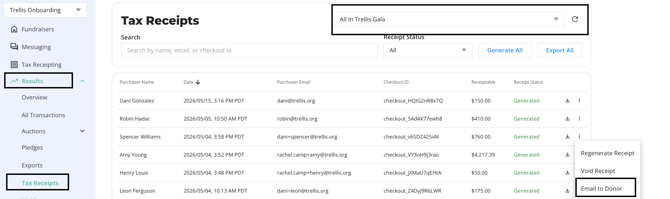
- From your Dashboard, navigate to Results > Tax Receipts.
- Use the search bar in the top-right to find your fundraiser.
- Search for the donor by name or email.
- Click the three-dot menu next to the donor's record.
- Select Email to Donor.
Frequently Asked Questions
Can I download the tax receipt instead of emailing it?
Yes, click the download icon beside the three-dot menu.
Related Articles
Need Help?
Did this answer your question? If not, please reach out to our Product Engagement Team via the blue chat icon or email support@trellis.org.