![Trellis-MainLogo-AllWhite-01.png]](https://help.trellis.org/hs-fs/hubfs/Trellis-MainLogo-AllWhite-01.png?height=40&name=Trellis-MainLogo-AllWhite-01.png)
Enabling Event Ticket PDFs
- From your dashboard, navigate to Fundraiser Builder > Event Tickets > Edit Event Settings > Advanced.
- Locate the Generate Event Ticket PDFs toggle.
- Toggle it on or off to enable or disable PDF ticket generation and delivery.
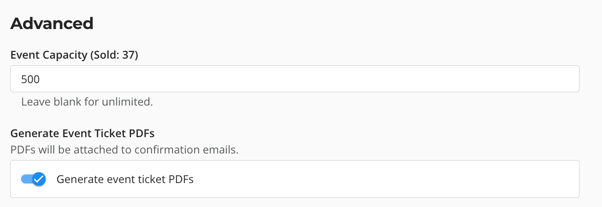
Please Note: The Send Electronic Tickets toggle is enabled by default for all events.
What Event Tickets Look Like
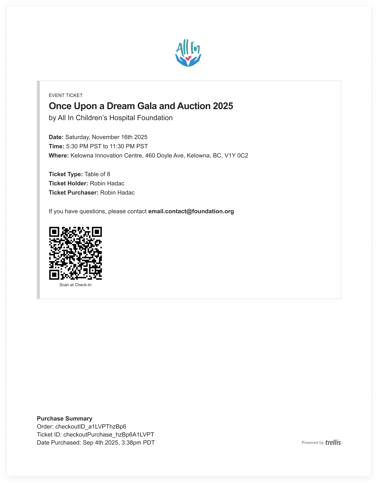
The PDF ticket attached to the confirmation email will look like the example below.
How Event Ticket Assignment Works
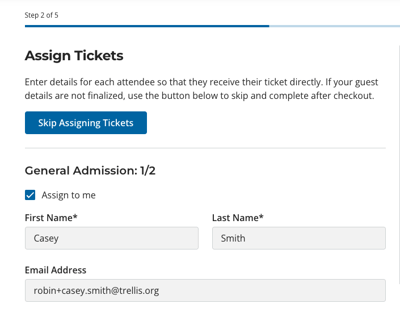
Tickets are generated automatically at purchase using the ticket holder's information. Delivery depends on whether tickets are assigned during checkout:
- If tickets are assigned during purchase — the ticket will display the holder's name, and copies will be sent to both the purchaser and the ticket holder.
- If ticket assignment is skipped during purchase — all tickets are assigned to the purchaser and emailed only to them.
Please Note: If the ticket holder's name is updated after purchase (by either the purchaser or your organization), Trellis automatically regenerates the ticket with the new name.
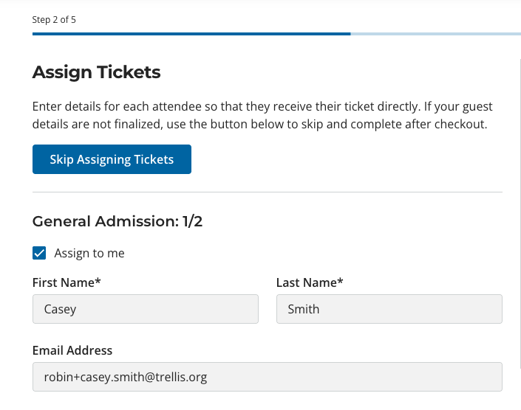
- If tickets are assigned during purchase, the tickets generated will have the ticket holder's name on them, and copies of the PDFs will be sent to both the purchaser and the ticket holder.
-
If ticket assignment is skipped during purchase, all generated tickets will be assigned to the purchaser and emailed only to them.
Frequently Asked Questions
Q: Can we customize the design or content of the event ticket PDF?
A: No, not at this time. We recommend you create a designed graphic/pamphlet you set as a custom attachment to event tickets. Then when a ticket is purchased or assigned, they receive both your custom graphic, and the auto-generated PDF from Trellis.
Q: Can we edit the email that is sent when sending a ticket holder their ticket?
A: No, not at this time, but it is something we have in the backlog and are monitoring for future improvement. If this is something you are interested in, please upvote it in our idea bank from the announcements sidebar in your dashboard or reach out to support@trellis.org.
Related Articles
How to Resend Event Ticket PDFs
Need Help?
Did this answer your question? If not, please reach out to our Product Engagement Team via the blue chat icon or email support@trellis.org.