---
title: How to Configure the Events Module Settings for the RE NXT Integration
description: Learn how to connect to an event in RE NXT so event participants and fees sync automatically.
---
[Skip to content](https://help.trellis.org/how-to-set-your-events-module-settings-for-a-specific-fundraiser#main-content)
English
Show submenu for translations
![Trellis-MainLogo-AllWhite-01.png\]](https://help.trellis.org/hs-fs/hubfs/Trellis-MainLogo-AllWhite-01.png?height=40&name=Trellis-MainLogo-AllWhite-01.png)
Open main navigation
Close main navigation
- English
Show submenu for translations
- [Raise an urgent issue (out of office hours)](https://formcrafts.com/a/urgentform)
[Raise an urgent issue (out of office hours)](https://formcrafts.com/a/urgentform)
Help & Learning
- There are no suggestions because the search field is empty.
1. [Help & Learning](https://help.trellis.org/?hsLang=en)
2. [Raiser's Edge NXT Integration](https://help.trellis.org/raisers-edge-nxt-integration?hsLang=en)
3. [Event Participation Sync](https://help.trellis.org/raisers-edge-nxt-integration?hsLang=en#event-participation-sync)
# How to Configure the Events Module Settings for the RE NXT Integration
## Learn how to connect to an event in RE NXT so event participants and fees sync automatically.
The Events module in RE NXT allows you to see which constituents participated in your event and what was paid in fees.
Our integration allows you to connect a fundraiser to an event in RE NXT, so you can use Trellis for the full event process and have data flow automatically before, during, and after the event.
**Please Note:** These settings can only be configured at the fundraiser level, not in the dashboard.
Prefer learning through video? We've got you covered!
### **How to Connect to an Event in RE NXT**
1. From Integration Settings, click **Events Module
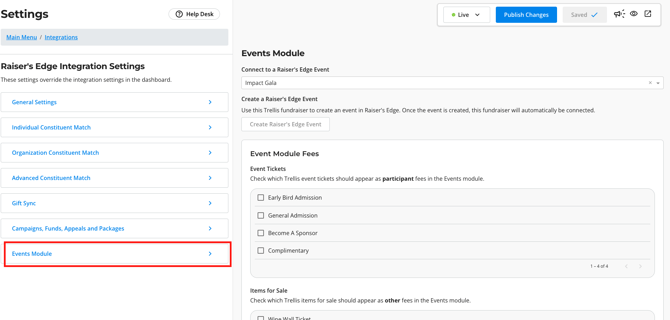**
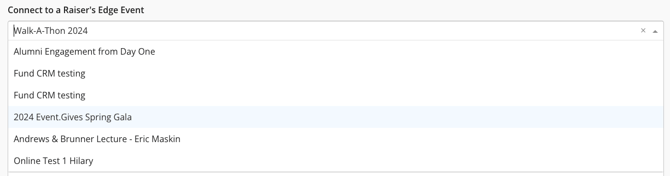
2. Connect to an **existing** **event in RE NXT** using the dropdown
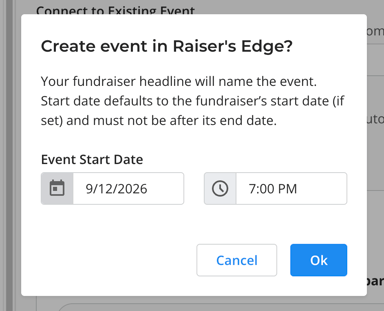
3. If you don't already have an event in RE NXT, you can **create one** from here.
1. Your fundraiser name will be used to name the event in RE NXT.
2. If you try to select a start date that is after the event end date on Trellis, the event creation will fail.
#### 
### **How to Set Up Event Fees**
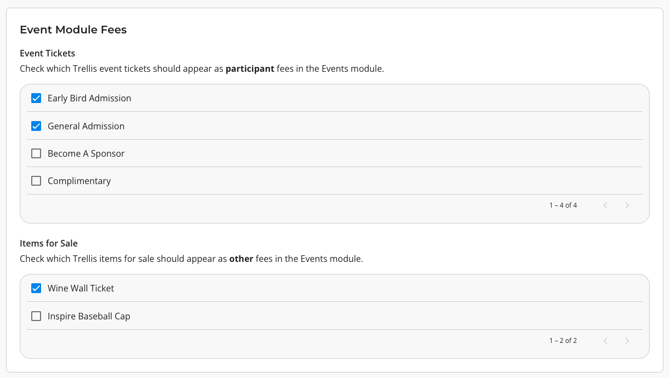
The Events module in RE NXT allows you to track Participant Fees and Other Fees as part of registration.
1. Choose which **Event Tickets** should appear as **Participant** fees
2. Choose which **Items for Sale** should appear as **Other** fees
3. Click **Save** once all settings have been configured
When connected, fees will only appear on the event participant who made the purchase. For example, if Bob Smith buys 4 tickets, 4 participants will appear in Raiser's Edge NXT but only Bob's participant record will have fees associated.
To learn more about how event participant records will appear in Raiser's Edge NXT and view our FAQ, click [here](https://help.trellis.org/how-our-re-integration-works-with-the-events-module?hsLang=en).
---
Did this answer your question? If not, please reach out to the Trellis Support team via the blue chat icon or email [support@trellis.org](mailto:support@trellis.org).
- [Admin & Reporting](https://help.trellis.org/admin-reporting?hsLang=en#main-content)
- [Welcome to Trellis](https://help.trellis.org/admin-reporting?hsLang=en#welcome-to-trellis)
- [Understanding Fees](https://help.trellis.org/admin-reporting?hsLang=en#understanding-fees)
- [Understanding British Columbia Provincial Sales Tax](https://help.trellis.org/admin-reporting?hsLang=en#understanding-british-columbia-provincial-sales-tax)
- [Reports & Exports](https://help.trellis.org/admin-reporting?hsLang=en#reports-exports)
- [Troubleshooting](https://help.trellis.org/admin-reporting?hsLang=en#troubleshooting)
- [Set Up and Manage Your Banking](https://help.trellis.org/set-up-and-manage-your-banking?hsLang=en#main-content)
- [Add Your Banking Details](https://help.trellis.org/set-up-and-manage-your-banking?hsLang=en#add-your-banking-details)
- [Understanding Your Payouts](https://help.trellis.org/set-up-and-manage-your-banking?hsLang=en#understanding-your-payouts)
- [Tax Receipts](https://help.trellis.org/tax-receipts?hsLang=en#main-content)
- [Set Up Your Tax Receipts](https://help.trellis.org/tax-receipts?hsLang=en#set-up-your-tax-receipts)
- [Manage Your Tax Receipts](https://help.trellis.org/tax-receipts?hsLang=en#manage-your-tax-receipts)
- [Build and Design Your Fundraiser](https://help.trellis.org/build-and-design-your-fundraiser?hsLang=en#main-content)
- [Build Your Fundraiser](https://help.trellis.org/build-and-design-your-fundraiser?hsLang=en#build-your-fundraiser)
- [Fundraiser Settings](https://help.trellis.org/build-and-design-your-fundraiser?hsLang=en#fundraiser-settings)
- [Manage Your Fundraiser](https://help.trellis.org/build-and-design-your-fundraiser?hsLang=en#manage-your-fundraiser)
- [Live Event Views](https://help.trellis.org/build-and-design-your-fundraiser?hsLang=en#live-event-views)
- [Messaging & Campaigns](https://help.trellis.org/messaging-campaigns?hsLang=en#main-content)
- [Automated Messages](https://help.trellis.org/messaging-campaigns?hsLang=en#automated-messages)
- [Creating Messaging Campaigns](https://help.trellis.org/messaging-campaigns?hsLang=en#creating-messaging-campaigns)
- [Manage Your Messaging Campaigns](https://help.trellis.org/messaging-campaigns?hsLang=en#manage-your-messaging-campaigns)
- [Analyze Your Messaging Campaigns](https://help.trellis.org/messaging-campaigns?hsLang=en#analyze-your-messaging-campaigns)
- [Donor Experience](https://help.trellis.org/messaging-campaigns?hsLang=en#donor-experience)
- [Event Ticketing](https://help.trellis.org/event-ticketing?hsLang=en#main-content)
- [Set Up Your Event Tickets](https://help.trellis.org/event-ticketing?hsLang=en#set-up-your-event-tickets)
- [Manage Your Attendees](https://help.trellis.org/event-ticketing?hsLang=en#manage-your-attendees)
- [Post-Event Management](https://help.trellis.org/event-ticketing?hsLang=en#post-event-management)
- [Donor Experience](https://help.trellis.org/event-ticketing?hsLang=en#donor-experience)
- [Sponsorships](https://help.trellis.org/sponsorships?hsLang=en)
- [Silent & Live Auctions](https://help.trellis.org/silent-live-auctions?hsLang=en#main-content)
- [Set Up Your Auction](https://help.trellis.org/silent-live-auctions?hsLang=en#set-up-your-auction)
- [Manage Your Auction](https://help.trellis.org/silent-live-auctions?hsLang=en#manage-your-auction)
- [Auction Close](https://help.trellis.org/silent-live-auctions?hsLang=en#auction-close)
- [Donor Experience](https://help.trellis.org/silent-live-auctions?hsLang=en#donor-experience)
- [Donations](https://help.trellis.org/donations?hsLang=en#main-content)
- [Set Up Your Donations](https://help.trellis.org/donations?hsLang=en#set-up-your-donations)
- [Donor Experience](https://help.trellis.org/donations?hsLang=en#donor-experience)
- [Items for Sale](https://help.trellis.org/items-for-sale?hsLang=en#main-content)
- [Set Up Your Items for Sale](https://help.trellis.org/items-for-sale?hsLang=en#set-up-your-items-for-sale)
- [Raffles & 50/50](https://help.trellis.org/raffles-50-50?hsLang=en#main-content)
- [How to Run a Raffle](https://help.trellis.org/raffles-50-50?hsLang=en#how-to-run-a-raffle)
- [Running a Raffle in the USA](https://help.trellis.org/raffles-50-50?hsLang=en#running-a-raffle-in-the-usa)
- [Managing Your Raffle](https://help.trellis.org/raffles-50-50?hsLang=en#managing-your-raffle)
- [Draw Winner & Reporting](https://help.trellis.org/raffles-50-50?hsLang=en#draw-winner-reporting)
- [Donor Experience](https://help.trellis.org/raffles-50-50?hsLang=en#donor-experience)
- [Raiser's Edge NXT Integration](https://help.trellis.org/raisers-edge-nxt-integration?hsLang=en#main-content)
- [Integration Set Up](https://help.trellis.org/raisers-edge-nxt-integration?hsLang=en#integration-set-up)
- [How the Integration Works](https://help.trellis.org/raisers-edge-nxt-integration?hsLang=en#how-the-integration-works)
- [Constituent Matching](https://help.trellis.org/raisers-edge-nxt-integration?hsLang=en#constituent-matching)
- [Gift Sync](https://help.trellis.org/raisers-edge-nxt-integration?hsLang=en#gift-sync)
- [Event Participation Sync](https://help.trellis.org/raisers-edge-nxt-integration?hsLang=en#event-participation-sync)
- [Sales Entry System (SES)](https://help.trellis.org/sales-entry-system-ses?hsLang=en)
- [Check-In Tool](https://help.trellis.org/check-in-tool?hsLang=en#main-content)
- [Introduction to the Check-In Tool](https://help.trellis.org/check-in-tool?hsLang=en#introduction-to-the-check-in-tool)
- [Managing Attendees](https://help.trellis.org/check-in-tool?hsLang=en#managing-attendees)
- [Event Day](https://help.trellis.org/check-in-tool?hsLang=en#event-day)
- [Post-Event Management](https://help.trellis.org/check-in-tool?hsLang=en#post-event-management)
- [Fund-a-Need](https://help.trellis.org/fund-a-need?hsLang=en#main-content)
- [Set Up Your Fund-a-Need](https://help.trellis.org/fund-a-need?hsLang=en#set-up-your-fund-a-need)
- [Manage Your Fund-a-Need](https://help.trellis.org/fund-a-need?hsLang=en#manage-your-fund-a-need)
- [Manage Pledges Post-Event](https://help.trellis.org/fund-a-need?hsLang=en#manage-pledges-post-event)
- [Security, Privacy & Technology](https://help.trellis.org/security-privacy-technology?hsLang=en)
- [New Features!](https://help.trellis.org/new-features?hsLang=en)
- [Resources for a Successful Fundraiser](https://help.trellis.org/resources-for-a-successful-fundraiser?hsLang=en#main-content)
- [Pre-Event Planning](https://help.trellis.org/resources-for-a-successful-fundraiser?hsLang=en#pre-event-planning)
- [Trellis Feature Spotlight](https://help.trellis.org/resources-for-a-successful-fundraiser?hsLang=en#trellis-feature-spotlight)
- [Support Resources for Donors](https://help.trellis.org/support-resources-for-donors?hsLang=en#main-content)
- [Getting Started](https://help.trellis.org/support-resources-for-donors?hsLang=en#getting-started)
- [Checkouts](https://help.trellis.org/support-resources-for-donors?hsLang=en#checkouts)
- [Participating in an Auction](https://help.trellis.org/support-resources-for-donors?hsLang=en#participating-in-an-auction)
[](https://trellis.org)
Copyright © 2026, Trellis Social Enterprise