![Trellis-MainLogo-AllWhite-01.png]](https://help.trellis.org/hs-fs/hubfs/Trellis-MainLogo-AllWhite-01.png?height=40&name=Trellis-MainLogo-AllWhite-01.png)
Trellis includes a library of interactive guides to help you get familiar with the platform at your own pace. Each guide walks you through a specific feature or setup task, step by step — whether you're setting up your first fundraiser or brushing up before your next event.
Guides are organized across four tabs, one for each Touchpoint:
- T1) Set Up & Launch: Build and launch your fundraiser page.
- T2) Connect RE NXT: Connect Your Trellis and Raiser's Edge NXT accounts, configure your integration settings, and sync a transaction.
- T3) Manage Your Fundraiser: Manage attendees, learn how to use the backend tools, and reporting.
- T4) Prepare for Event Day: Get ready for event day, including check-in and post-event management.
Please Note: If you're currently onboarding with Trellis, completing guides is a key part of the process. Once you've finished all the guides in a tab, reach out to schedule your next onboarding session before moving on.
How to Access the Guides
- Log in to your Trellis account and look for the green Guides button in the bottom-right corner of your screen.

- Click Guides to open the guide menu.
- Browse the available guides, organized across five tabs at the top of the menu — each tab corresponds to a different phase of your onboarding.
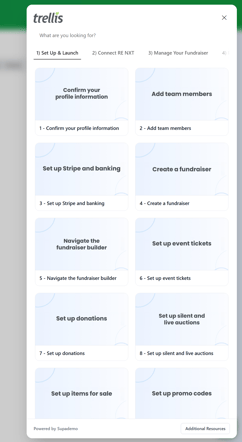
- Click on any guide tile to open it.
How to Complete a Guide
- When a guide opens, enter your email address in the Email field and click Get started.
- Click through each step, following the instructions on screen — the guide will highlight what to look at or do at each stage.
- Keep an eye on the progress bar at the bottom of the guide to see how far along you are.
- Continue clicking through until you reach the final step, which will include next steps and a link to the following guide.
Tip: For the best experience, open the guide in a new tab so you can follow along in your account at the same time.
Moving Through Your Onboarding
Work through each guide within a tab before moving on to the next. Once you've completed all the guides in a tab:
- Email support@trellis.org to let the team know you're done and to schedule your next onboarding session.
- After that session, move on to the next tab and repeat the process.
The last step of each guide will also tell you exactly what to do next, so you're never left guessing.
Frequently Asked Questions
Do I have to be onboarding to use the guides?
Not at all. The guides are a great resource even after onboarding — use them as a refresher before your next event or to explore a feature you haven't used before.
Do I have to complete the guides in order?
We recommend completing them in order within each tab, as later guides often build on what earlier ones cover. The tabs themselves are also designed to follow your fundraiser progression.
Why do I need to enter my email to start a guide?
Your email lets the Trellis team track your progress so they know when you're ready for the next step in your onboarding.
What if I want to revisit a guide I've already completed?
You can reopen any guide from the Guides menu at any time — there's no limit on how many times you can go through them.
How do I share feedback on the guides?
We'd love to hear what's working and what could be improved. You can share feedback during your onboarding sessions, leave a comment directly in a guide, or reach out anytime at support@trellis.org.