![Trellis-MainLogo-AllWhite-01.png]](https://help.trellis.org/hs-fs/hubfs/Trellis-MainLogo-AllWhite-01.png?height=40&name=Trellis-MainLogo-AllWhite-01.png)
Fund-A-Need (FAN) is a paddle raise tool that lets donors quickly pledge or donate during your event — either from their mobile devices or via physical paddles recorded by volunteers. Before running your Fund-A-Need, you'll need to configure your giving levels and payment settings in the fundraiser builder.
How to Set Up Fund-A-Need
- From your dashboard, navigate to the Fundraiser Builder.
- Select Donations.
- Toggle on Enable Fund a Need.
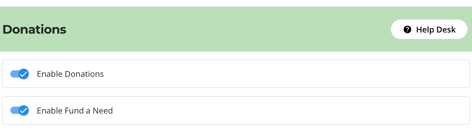
- Click Edit Fund a Need.
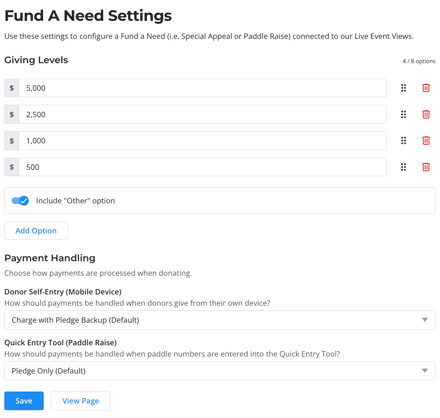
- Configure your Giving Levels.
- Configure your Payment Option settings:
- Pledge Only (Recommended): All entries are recorded as pledges — no cards are charged.
- Charge with Pledge Backup: Donors with a card on file are charged immediately on entry. Donors without a card saved will have a pledge entered instead.
- Charge Only: All donors are required to pay for their donation right away. If there is no saved credit card on file, they will be pushed to the regular checkout flow, where they can enter credit card information.
- Click Publish Changes.
Frequently Asked Questions
How is FAN donation revenue tracked in reports?
We currently do not track FAN donation revenue as a separate line item in reports. Right now, all FAN Donations are considered "Custom Donations" and will appear under that category in your exports.
For 2027, we are looking into making a change so that FAN revenue can be tracked and reported on separately.
Can we configure RE NXT Campaign, Fund, Appeal and Package for FAN donations separately?
No, not at this time. Since FAN revenue is tracked as custom donation revenue (see question above), you will want to set CFAP labels for custom donations to account for your FAN.
Related Articles
Need Help?
Did this answer your question? If not, please reach out to our Product Engagement Team via the blue chat icon or email support@trellis.org.