![Trellis-MainLogo-AllWhite-01.png]](https://help.trellis.org/hs-fs/hubfs/Trellis-MainLogo-AllWhite-01.png?height=40&name=Trellis-MainLogo-AllWhite-01.png)
How to View a Transaction's Sync Status
- From the Dashboard, go to Results, then All Transactions.
- Select a fundraiser in the top right corner to see data.
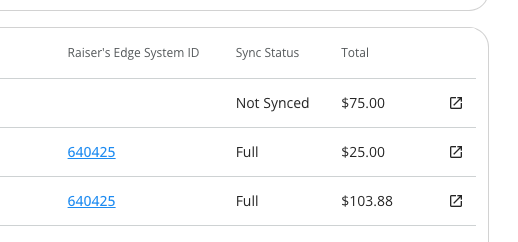
- Find the Sync Status column next to the Raiser’s Edge System ID column.
- This column will display one of the following statuses:
- Full: The transaction has synced completely.
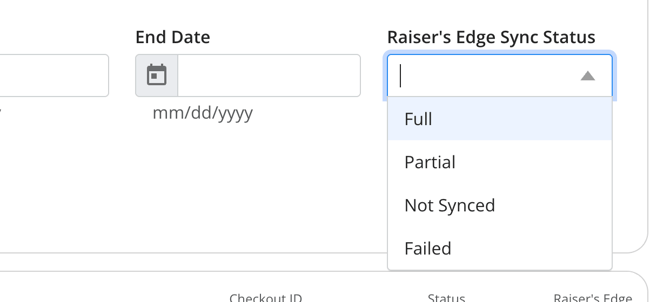
- Partial: Some parts of the transaction didn’t sync, such as the gift or the event record.
- Not Synced: The transaction hasn’t been synced yet.
- Failed: The sync attempt failed entirely, either due to a technical error or a configuration error, and needs to be resynced by Trellis.
- In Progress: The transaction is actively syncing to RE NXT.
- Pending: The transaction is in the queue to sync after earlier transactions have finished.
- This column will display one of the following statuses:
-
Click the Open Filter button to show filter options.
-
Below the Payment Status filter, you’ll find the Raiser’s Edge Sync Status filter.
-
Choose one or more of the filter options.
-
The table results will then only show the transactions that match your filter.
This information is also available in your All Transactions Export spreadsheet.
How to Find More Information via the Audit Log
To learn more details on the syncs what what data was moved, you can use the Audit Log.
- From the Dashboard, go to Integrations then Blackbaud.
- Next to the Settings button, click Audit Log.
- This downloads a report of all sync activity across the three primary sync actions:
- Constituent Matching: the process of finding an existing constituent or creating a new one based on the purchaser or ticket holder information.
- Gift Syncing: the process of adding the gift to the constituent, using the gift sync configurations such as Campaign, Fund, Appeal, and Package.
- Event Participants: the process of adding participants to an event in Raiser's Edge using Trellis ticket holder information.
- If there is a particular transaction you want to check, search in the Audit Log for the checkoutID on each tab.
Learn more about the Audit Log.
Please Note: The audit log does not show transactions that failed to sync.
Frequently Asked Questions
Why did a transaction fail or only partially sync?
Transactions might fail to sync for a number of reasons. Here are some of the most common reasons we see:
-
Fund is missing from a gift.
-
The Appeal and Package combination is valid.
- There is a permissions issue that is blocking part of the integration.
The dashboard will now show you an error for why the transaction failed, so you can troubleshoot and try resyncing the transaction yourself.
A transaction has been stuck "in progress" for over a day, what do we do?
Please report to us using this form, so our development team can push through the sync. This happens because the sync process can now take 5-10 minutes per transaction due to the complexity of the integration, and sometimes other actions can interrupt the sync.
Is there a way to pull a report of all transactions that failed to sync?
You can filter the All Transactions export by RE NXT sync status to get a report of transactions that failed. There is currently no way to pull a report of failed transactions across all fundraisers.