![Trellis-MainLogo-AllWhite-01.png]](https://help.trellis.org/hs-fs/hubfs/Trellis-MainLogo-AllWhite-01.png?height=40&name=Trellis-MainLogo-AllWhite-01.png)
Rapid Check-In skips the prompt to gather attendee details during check-in. It's ideal for non-seated events, where you just need to confirm a guest has a ticket, not collect their information.
Rapid Check-In can be used in tandem with our QR Code Scanning feature, which allows you to scan the QR code on an event ticket to quickly find and check-in the attendee.
Please Note: If you're hosting a seated event, like a gala, and need to collect attendee information or save payment methods, use our regular check-in process instead. See these articles:
How to Enable Rapid Check-In
- From your Fundraiser Builder, go to Check-In Tool from the left-hand menu.
- Enable the Rapid Check-In toggle.
- Click Publish to confirm the change.
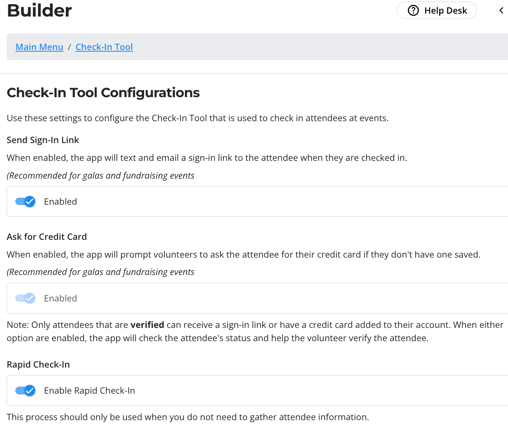
Heads Up! With Rapid Check-In enabled, volunteers won't be prompted to collect contact info or credit card details. Attendees with a phone number on file will still receive a Sign-In Link.
How to Check In Attendees with Rapid Check-In
- Go to your fundraiser's Check-In Tool, either from the dashboard or at esm.trellis.org.
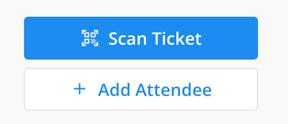
- Search for the attendee, or click Scan Ticket to open the QR code scanner if guests have their tickets on hand.
- Position the QR Code scanner over the QR code on the ticket.
- The scanner then "clicks" the Check-In button for that attendee, the same as if you had found them in the check-in tool manually.
- A success popup confirms the attendee is checked in. No prompt for contact info or payment details will appear.
- Move on to the next attendee.
Frequently Asked Questions
Do I have to use Rapid Check-In to use the QR code scanner?
No. The QR code scanner is always available in the Check-In Tool, even during a regular check-in process. It also works on laptops with a webcam.
Will attendees receive any communication when checked in?
Attendees with a phone number on file get a welcome text with a link to your fundraiser. Attendees without a phone number on file receive no communication.
We're hosting a gala but still want fast check-in. Can we use Rapid Check-In?
You should only use Rapid Check-In if you do not need to collect attendee information. Typically for galas, it is important to know everyone who attends, and ensure they are seated at a table. Our regular check-in process is designed to reduce friction at registration when collecting guest info.
How many volunteers do we need at registration for Rapid Check-In?
For ticket scanning only, plan for 1 volunteer per 75-100 attendees. If volunteers are also handing out gifts or other items, consider 1 volunteer per 50 attendees.
What happens if the same QR code is scanned twice?
The system doesn't track prior scans. Each scan simply triggers the check-in process again.
Related Articles
- Getting Started with the Check-In Tool
- How to Check In and Manage Attendees
- Template: Volunteer Check-In Instructions
Need help?
Reach out to our Product Engagement Team via the blue chat icon or by emailing support@trellis.org.