![Trellis-MainLogo-AllWhite-01.png]](https://help.trellis.org/hs-fs/hubfs/Trellis-MainLogo-AllWhite-01.png?height=40&name=Trellis-MainLogo-AllWhite-01.png)
How to View Your Purchased Tickets
- From the fundraiser page, click Log In in the top right corner and enter your email to receive a login link.
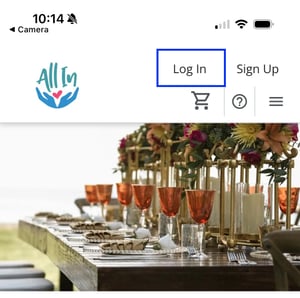
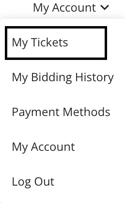
- From the fundraiser page, click My Account in the top right corner to open the menu.

- Select My Tickets from the menu.
- On the My Tickets page, find your tickets listed under Purchased Tickets.
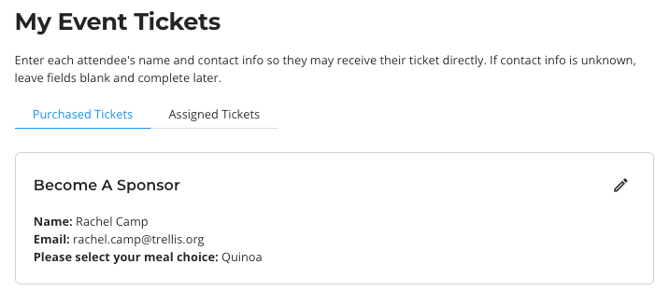
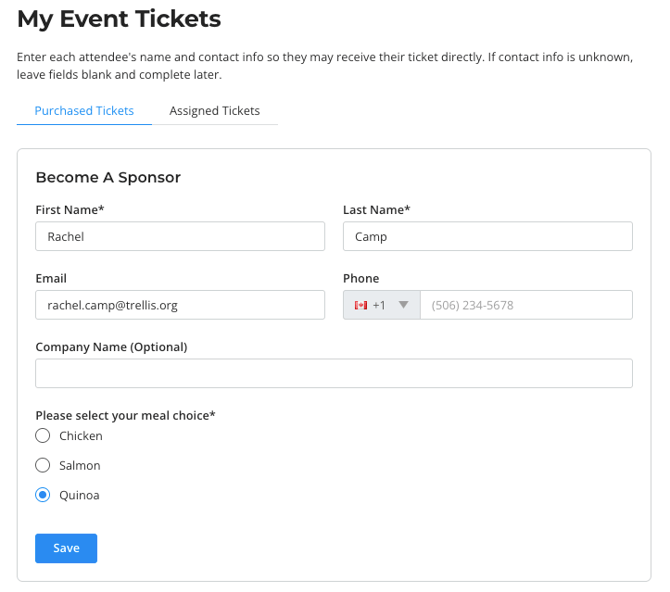
Please Note: Purchased Tickets only shows tickets you bought yourself. If someone else bought a ticket and assigned it to you, it will appear under Assigned Tickets instead.
Frequently Asked Questions
What's the difference between "Purchased Tickets" and "Assigned Tickets"?
Purchased Tickets are all tickets you've bought, regardless of who they're assigned to. Assigned Tickets are tickets that someone else purchased and assigned to you.
My purchase confirmation email link no longer works. How do I get back in?
Login links expire for security. From the fundraiser page, click Log In in the top right corner and enter your email to receive a new one.
Can I give one of my tickets to someone else?
Yes. As the purchaser, you can assign any of your tickets to a guest from the My Tickets page.
Related Articles
- How to Log In to Your Account as a Donor
- How to Assign Event Tickets to Your Guests
- How to Update Your Custom Field Responses
- How to View Tickets That You've Been Assigned
If you need further assistance or have additional questions, please reach out to the event organizer.