![Trellis-MainLogo-AllWhite-01.png]](https://help.trellis.org/hs-fs/hubfs/Trellis-MainLogo-AllWhite-01.png?height=40&name=Trellis-MainLogo-AllWhite-01.png)
Tax receipts are issued to donors for eligible contributions made through your fundraiser. The Tax Receipts page gives you a centralized view of all receipts tied to a specific fundraiser, so you can track their status, search for individual donors, and export records as needed.
How to View Tax Receipts
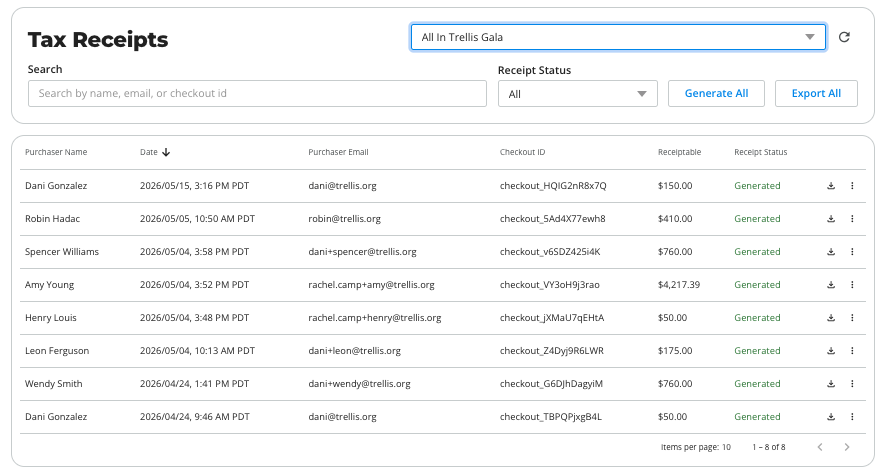
- From your Trellis Dashboard, navigate to Results > Tax Receipts in the sidebar.
- Use the dropdown in the top-right corner to select the fundraiser you want to view tax receipts for.
- Review the receipt list, which displays each transaction's:
- Purchaser Name
- Date
- Purchaser Email
- Checkout ID
- Receiptable amount
- Receipt Status.
- Use the Search bar to look up a specific donor by name, email, or checkout ID.
- Use the Receipt Status dropdown to filter by status.
- To download a full record of receipts, click Export All.
- To generate Not Generated tax receipts in bulk, click Generate All.
Receipts with a status of Not Generated have not yet been issued to the donor.
Frequently Asked Questions
What does "Not Generated" mean?
It means a tax receipt has not yet been created for that transaction. Click the question mark in the circle for the reason.
Can I download an individual receipt?
Yes. For transactions with a Generated status, a download icon will appear in the row. Click it to download that receipt directly.
Can I filter receipts by fundraiser?
Yes. Use the fundraiser dropdown in the top-right corner of the Tax Receipts page to switch between fundraisers and view their respective receipts.
The purchaser said they didn't receive their tax receipt, can I resend it to them?
Yes, either from the system via the 3-dot icon menu, or by downloading the tax receipt and sending it manually to them.
Related Articles
How to Set Up Tax Receipts on Trellis
What are Tax Receiptable Amounts
How to Update and Regenerate Tax Receipts
How Tax Receipts Work with the Raiser's Edge Integration
Need Help?
If you have questions or need assistance, reach out to our Product Engagement Team via the blue chat icon or email support@trellis.org.