![Trellis-MainLogo-AllWhite-01.png]](https://help.trellis.org/hs-fs/hubfs/Trellis-MainLogo-AllWhite-01.png?height=40&name=Trellis-MainLogo-AllWhite-01.png)
When your raffle is published by the Trellis team, your Raffle page is automatically generated to include all required information from your gaming license.
-
Raffle Preview
This section shows your prizes and allows supporters to purchase raffle tickets.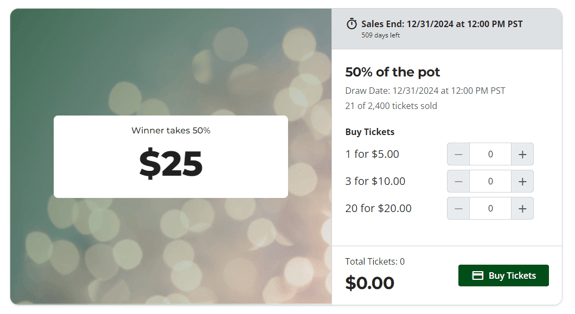
-
Rules of Play
Trellis adds this section for you when you provide your gaming license and a copy of your approved Rules of Play. -
Raffle Footer
This includes your license number and required draw details, as mandated by gaming authorities.
Please Note:
These sections must also appear on your fundraiser’s home page and cannot be deleted.
How to Edit the Raffle Page
The raffles page itself does not have a builder, like your fundraiser's home page. However, if you want information to also appear on your raffles page, you can choose to mirror sections from your main page to your raffle page.
- Add a new section to your fundraiser's home page, such as a Custom Section
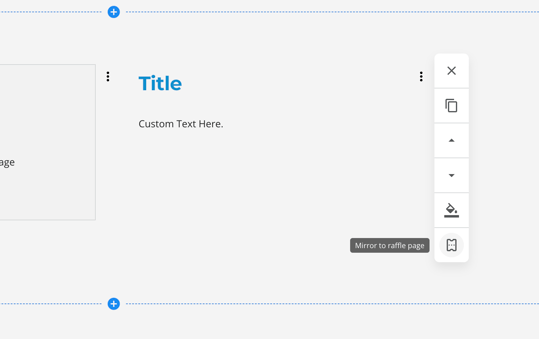
- On the right hand side, look for the ticket icon to Mirror to Raffle Page
- Click the icon. This section will now appear on both your home page and raffle page.
- As you mirror sections to your raffles page, they will appear in the same order as your fundraiser's home page.
This feature is great if you want to:
- Feature your sponsors on your raffles page
- Tell your story around the raffle
- Add additional information regarding purchasing of raffle tickets
How to Hide the Raffle Page
If you don't want to have a page dedicated to your raffle, here is how you can remove this from your navigation.
- From the fundraiser builder, go to Fundraiser Settings > Site Header
- Under Links in Header, look for Raffle, and uncheck the checkbox.
- Publish your fundraiser.
- The Raffle page will no longer appear in your navigation.
Need Help?
Did this answer your question? If not, please reach out to our Product Engagement Team at support@trellis.org.