![Trellis-MainLogo-AllWhite-01.png]](https://help.trellis.org/hs-fs/hubfs/Trellis-MainLogo-AllWhite-01.png?height=40&name=Trellis-MainLogo-AllWhite-01.png)
In Events in Raiser's Edge NXT, fees and payments correspond to amounts event participants owe and have paid related to the event.
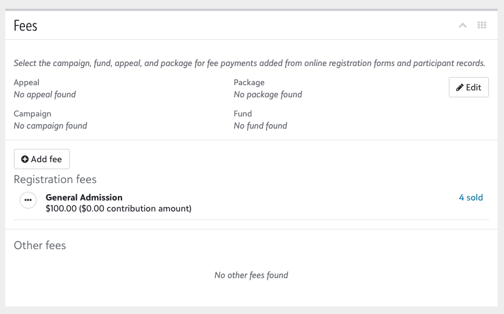
Our integration allows you to set up Event Tickets and Items for Sale as fees on the event record.
How to Set Up Fees and Payments
-
Go to your Fundraiser's Integration Settings
-
From the Dashboard, click Edit on a fundraiser to open the Fundraiser Builder
-
Then on the left-hand side through Settings click Integrations
-
In the Integrations section, select Events Module
-
- Configure Event Module Settings
- Ensure you have connected to an existing event in Raiser's Edge NXT (learn more)
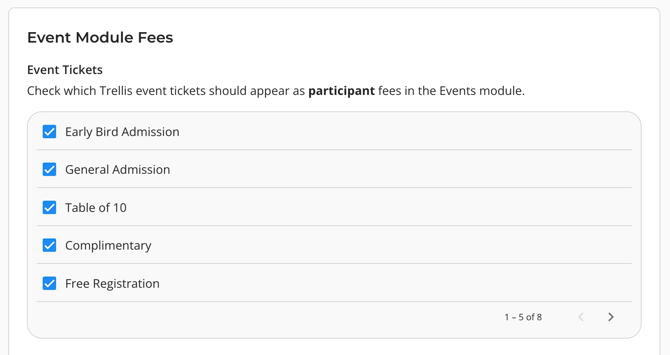
- Connect event tickets and items for sale:
- Choose which event tickets and items for sale you want to appear as a fee
- Click Save at the bottom of your page, and Publish your fundraiser.
Integration Behaviour
Once connected, the integration will:
- Automatically create a fee for the Event
- Show the fee for any synced transactions under the purchaser's participation record
- Event ticket fees won't appear for guests of the purchaser.
- Link a payment to the fee using the gift on the Constituent Record.*
Please Note:
The integration cannot connect to existing fees in RE NXT.
Do not set up your fees directly in RE NXT. The integration will handle creating necessary fees based on the connected tickets and items.
As well, editing fees created by the integration directly in RE NXT may cause fees to stop syncing.
Frequently Asked Questions
Can donations and other types of fundraising revenue sync as fees to the event in RE NXT?
No, only event tickets and items for sale can sync as fees to the event. Blackbaud recommends using Campaign, Fund, and Appeal to track your entire event's revenue, rather than the fees and payments on an event.
If an event ticket order is unpaid, will that pledge appear as a fee on the participant?
No, unpaid event ticket orders on Trellis do not sync to RE NXT until they are paid. Once it is paid, both the fee and the payment (gift) will sync to RE NXT.
Is it possible to sync a fee and a payment without having a corresponding gift?
Fees can sync but all payments must link back to a gift in RE NXT.
If we already have a fee set up in RE NXT, can we connect a Trellis driver to that fee?
No, our integration cannot connect to existing fees. It must create a new fee and use that one to sync the fee data.
Why aren't all items that were sold appearing in our Event revenue in RE NXT?
If the donor who purchased the item is not an event participant, than that purchase won't sync as a fee. We recommend using your reports in Trellis, or Campaign, Fund and Appeal to keep track of all your event revenue.
A donor purchased an item at the event - why isn't the fee showing up on their participant record?
If the donor used a different email for purchasing the item than the email they used for registration, then the new purchase won't match to that participant.
We can only sync fees that match an existing participant record that we linked during the initial setup.
Need help?
Reach out to our Product Engagement Team via the blue chat icon or at support@trellis.org and we would be happy to assist.